
Falcon Slider
Falcon Slider is a layer-based slider builder for FalconCMS — a Slider-Revolution-class engine for hero sliders, banners, and animated showcases. Design every slide on a visual canvas, drop in layers (text, images, buttons, video, countdowns and more), give each layer its own timeline animation, and embed the result anywhere with a shortcode.
Pro feature
Falcon Slider is part of FalconCMS Pro. It appears in the admin sidebar once a Pro license is active. See Installing Pro.
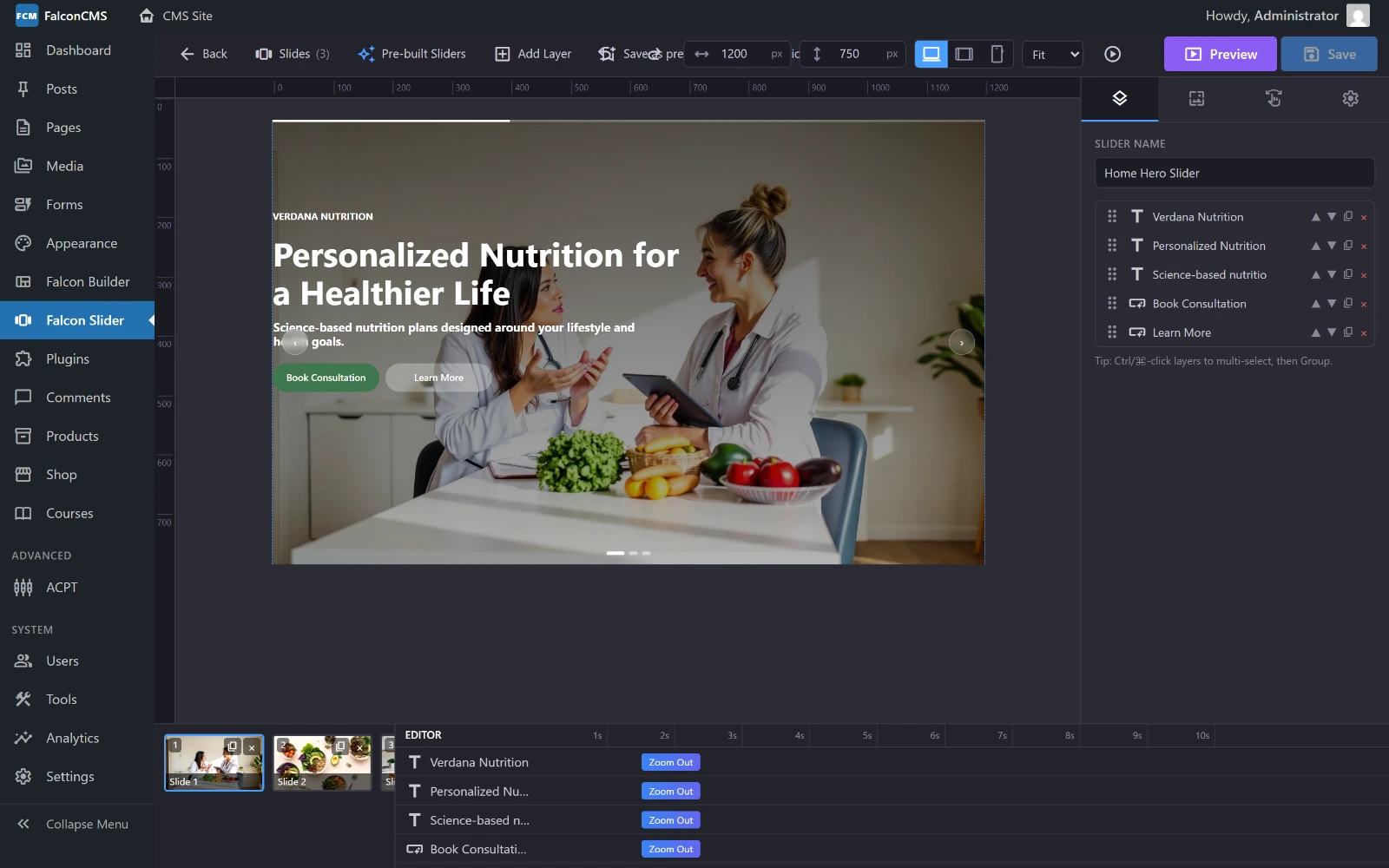
The editor: slide rail along the bottom left, the canvas in the middle, the layer panel on the right, and the animation timeline underneath.
What you can build
- Full-screen hero sliders with video or Ken-Burns backgrounds
- Promo banners with countdown timers and call-to-action buttons
- Animated showcases where every headline, image and shape animates in on its own schedule
- Auto-playing carousels with arrows, bullets, progress bars and thumbnail navigation
Every slider is fully responsive — position, size, visibility and font-size can be tuned per device (desktop / tablet / mobile).
Feature highlights
| Area | What's included |
|---|---|
| Slides | Unlimited slides, per-slide backgrounds, transitions, whole-slide links |
| Backgrounds | Solid colour, gradient, image, self-hosted video, YouTube / Vimeo, colour & gradient overlays, Ken Burns, parallax |
| Layers | Text, Image, Button, Shape, Icon, Video, Audio, Countdown, HTML/Embed |
| Animation | 15 entrance/exit presets, text reveal (typewriter / split), idle loops, per-layer delay·duration·easing |
| Navigation | Arrows, bullets, progress bar, thumbnails, autoplay, loop, pause-on-hover |
| Productivity | Pre-built templates, save-as-template, duplicate, import / export, version history, full-screen live preview |
| Performance | LCP image preload, layout-shift-free rendering, lazy media, subset font & icon loading |
Opening the editor
- Go to Admin → Falcon Slider
- Click New Slider, give it a name, and the full-screen editor opens
- On a brand-new slider the Pre-built Sliders gallery opens first — pick a ready-made design or close it to start blank
The editor interface
┌───────────────────────────────────────────────────────────────────┐
│ [← Back] Slides  Pre-built  +Add Layer  Save-as-prebuilt  Revisions │  ← Toolbar
│                  [Undo][Redo]  [W][H] [🖥 Tablet Mobile]  [Preview][Save] │
├──────────┬──────────────────────────────────────────┬───────────────┤
│          │                                          │               │
│  Slides  │              Canvas                       │   Settings    │
│  rail    │   (live, scaled preview of the slide)     │   (Layers /   │
│  (thumbs)│                                          │  Slide / Nav) │
│          │                                          │               │
└──────────┴──────────────────────────────────────────┴───────────────┘- Toolbar — add layers, undo/redo, device switch, Revisions, Preview and Save
- Slides rail (left) — thumbnails of every slide; drag to reorder, click to edit
- Canvas (centre) — a live, scaled preview; drag and resize layers directly
- Settings (right) — tabs for the selected Layer, the Slide, and the whole slider (Nav / Settings)
Embedding a slider
Once saved, a slider is active and can be placed on any page in two ways.
1. Shortcode
Use the shortcode in any content, widget, or Blade view that renders shortcodes:
[falcon_slider id="1"]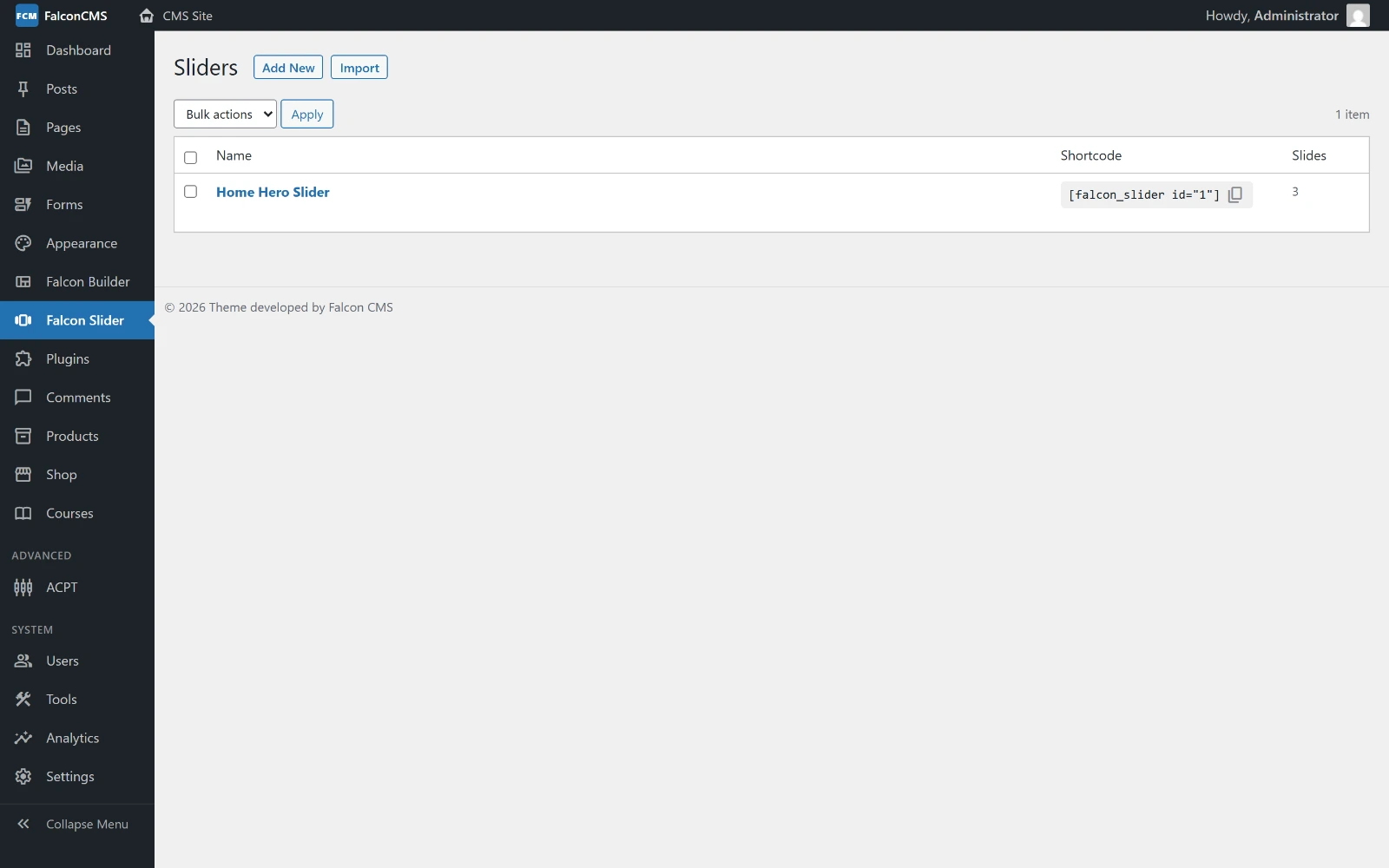
Admin → Falcon Slider lists every slider with its shortcode ready to copy, and how many slides it holds.
You can reference a slider by id or by slug:
[falcon_slider slug="homepage-hero"]2. Falcon Builder element
In Falcon Builder, open the element picker and add the Falcon Slider element. In its settings, pick the slider from the dropdown — the live slider renders right on the builder canvas.
Inactive sliders render nothing
A slider only outputs on the frontend while it is active. An inactive (draft) slider's shortcode produces no markup.
Performance & Core Web Vitals
Falcon Slider is built to stay fast and pass Core Web Vitals out of the box:
- LCP — the first slide's background image is preloaded with
fetchpriority="high"so it paints immediately. - CLS — the slider reserves its exact height (via aspect-ratio or a min-height) before the runtime boots, so nothing shifts on load.
- Lazy media — off-screen slides don't download their images or video until they're about to show.
- Subset fonts & icons — only the Google Font weights and the exact Material Symbols glyphs a slider actually uses are requested.
Next steps
- Slides & Backgrounds — build slides, set backgrounds and transitions
- Layers — add and position every layer type
- Animations — entrance, reveal and idle-loop animation
- Navigation & Managing — arrows, autoplay, revisions and preview