
Plugins
Plugins are FalconCMS's functionality layer — the counterpart to themes, which handle presentation. A plugin is a drop-in folder that can add admin pages, settings, routes, views, database tables and hooks, without touching the CMS or your theme.
Plugins are free and unrestricted — anyone can write, install and share them.
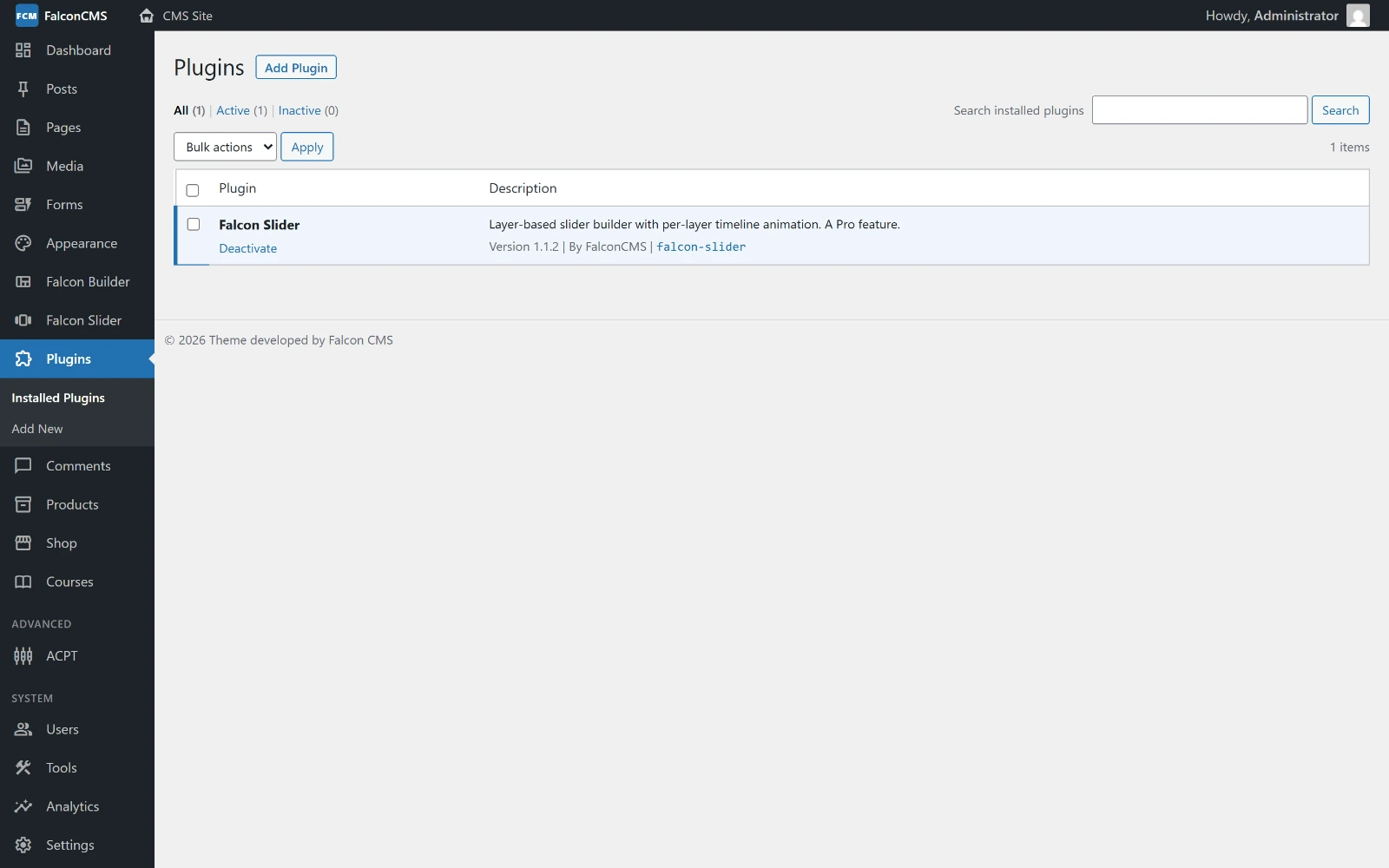
Installed plugins, with activate, deactivate and delete. Dragging a .zip onto this screen installs one.
Theme parity
Anything a theme can do from functions.php, a plugin can do from plugin.php. Both are loaded at the same point in the boot cycle, so plugins can use every hook a theme can — including early, register-time filters.
Managing Plugins
The Plugins screen
Go to Plugins in the admin sidebar. It has two sub-pages:
| Page | What it does |
|---|---|
| Installed Plugins | Lists every plugin found on disk with its status. Filter by All / Active / Inactive, search, and use the row actions to Activate, Deactivate, Update or Uninstall. |
| Add New | Install a plugin by dragging a .zip onto the drop zone, or by pasting a direct link to a .zip (e.g. a GitHub release asset). |
Installing
Three ways, all equivalent:
- Drag & drop — Plugins → Add New, drop the
.zip, click Install Now. - From URL — Plugins → Add New, paste a direct
.ziplink, click Install. - Drop-in — copy the plugin folder into your app's
resources/views/plugins/directory.
Installing only puts the files in place. Activate it to switch it on — that's when its migrations run and its code starts loading.
Coming from an older install?
Plugins used to live in a plugins/ directory at the project root. php artisan falcon:update moves them into resources/views/plugins for you, keeping every plugin's active/inactive state and data. Until that runs, the old location keeps working — nothing breaks if you update the package without it.
Updating
Replace the plugin's files with a newer version (re-upload the .zip after uninstalling, or drop the new files in). When the version in plugin.json is newer than the version that was activated, the Plugins screen shows Update available. Click Update to run any new migrations and record the new version.
Uninstalling
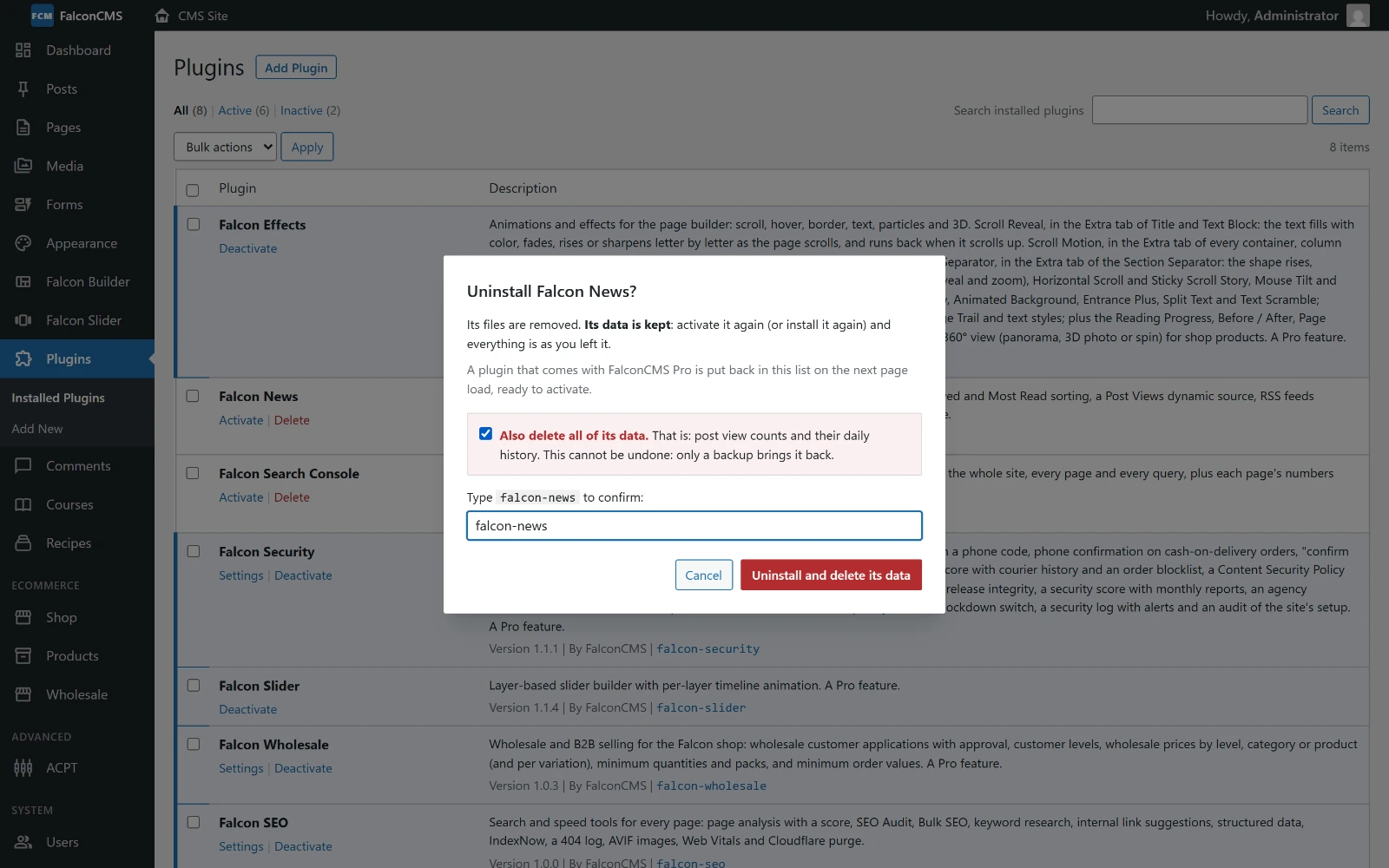
Delete opens a dialog. By default it deactivates the plugin, deletes its folder and removes its record, but keeps its data: its settings and its own tables stay, so activating it again (or installing it again) brings everything back as it was. A plugin that comes with FalconCMS Pro reappears in the list on the next page load, ready to activate.
To remove the data as well, tick Also delete all of its data and type the plugin's slug. Then the plugin's lifecycle uninstall() runs and its migrations are rolled back. That cannot be undone — only a backup brings the data back. Uninstalling several plugins at once (bulk action) never deletes data.
From the command line
php artisan plugin:list                  # show plugins and their status
php artisan plugin:activate <slug>       # activate (runs its migrations)
php artisan plugin:deactivate <slug>     # deactivate
php artisan make:plugin "My Plugin"      # scaffold a new plugin
Permissions
Managing plugins requires the manage_plugins permission. Administrators have it automatically; assign it to other roles under Users → Roles.
Plugins run PHP
A plugin executes arbitrary PHP with your application's privileges — exactly like a theme. Only install plugins from sources you trust.
Writing a Plugin
Scaffold one
php artisan make:plugin "SEO Booster"This creates resources/views/plugins/seo-booster/ with a manifest, a bootstrap file and a lifecycle class ready to fill in.
Folder structure
Only plugin.json is required. Everything else is picked up by convention if present — you rarely need to write a ServiceProvider.
resources/views/plugins/seo-booster/
├── plugin.json                 # manifest (required)
├── plugin.php                  # bootstrap — hooks, menus, settings
├── src/                        # PSR-4 classes (namespace from the manifest)
│   └── Lifecycle.php
├── routes/web.php              # auto-registered routes
├── database/migrations/        # run on activation
└── resources/views/            # available as "seo-booster::view-name"
The manifest — plugin.json
{
    "name": "SEO Booster",
    "slug": "seo-booster",
    "version": "1.0.0",
    "description": "Adds extra SEO controls.",
    "author": "Your Name",
    "requires_php": ">=8.1",
    "requires_cms": ">=2.0",
    "namespace": "SeoBooster\\",
    "lifecycle": "SeoBooster\\Lifecycle",
    "provider": "SeoBooster\\SeoBoosterServiceProvider",
    "dependencies": []
}| Key | Required | Description |
|---|---|---|
name | ✅ | Display name shown in the admin. |
slug | ✅ | Unique id. Also the view namespace. Restricted to A–Z a–z 0–9 _ -. |
version | ✅ | Used for update detection. |
description, author | — | Shown on the Plugins screen. |
requires_php | — | Checked on activation, e.g. ">=8.1". |
requires_cms | — | Minimum FalconCMS version. |
namespace | — | PSR-4 root, autoloaded from src/ (or the plugin folder). |
lifecycle | — | Class with optional activate/deactivate/uninstall/upgrade methods. |
provider | — | A Laravel ServiceProvider, registered on load. |
bootstrap | — | Bootstrap filename. Defaults to plugin.php. |
settings_route | — | Name of the route for the plugin's settings page, e.g. "seo-booster.settings". While the plugin is active, the Plugins screen shows a Settings link to it. |
settings_params | — | Query for that link, e.g. {"tab": "experience"} to open one tab of a shared settings screen. |
dependencies | — | Slugs that must be installed and active first. |
data | — | What the plugin's data is, in a few words (e.g. "every slider and its revisions"). The uninstall dialog shows it beside Also delete all of its data. |
The bootstrap — plugin.php
Loaded only while the plugin is active — the plugin equivalent of a theme's functions.php.
<?php

// Frontend: filter content as it renders
add_falcon_filter('falcon_product_description', function ($description) {
    return $description . '<p>Shipping is free this week.</p>';
});

// Backend: add a field to the native General settings page
add_falcon_action('falcon_register_settings', function () {
    falcon_add_settings_field([
        'id'    => 'seo_booster_api_key',
        'label' => 'API Key',
        'type'  => 'text',
    ]);
});

// Backend: add a sidebar menu page
falcon_add_menu_page([
    'slug'  => 'seo-booster',
    'title' => 'SEO Booster',
    'icon'  => 'trending_up',
    'route' => 'seo-booster.dashboard',
]);
See the Hooks API, Admin Menu API and Settings Fields API for everything available here.
Lifecycle hooks
Point lifecycle at a class; every method is optional.
<?php

namespace SeoBooster;

class Lifecycle
{
    public function activate(): void
    {
        // Runs once when activated — seed defaults, create files.
    }

    public function deactivate(): void
    {
        // Runs when switched off. Leave data intact.
    }

    public function uninstall(): void
    {
        // Runs only when the data is deleted too (ticked and typed in the uninstall
        // dialog) — drop your options here; your migrations are rolled back after it.
    }

    public function upgrade(?string $previousVersion): void
    {
        // Runs on Update — migrate data from an older release.
    }
}
Routes
routes/web.php inside your plugin is registered automatically — and before the CMS frontend catch-all, so your URLs resolve.
use Illuminate\Support\Facades\Route;

Route::get('/seo-report', function () {
    return view('seo-booster::report');
})->middleware('web')->name('seo-booster.report');
TIP
Add ->middleware('web') if your route needs sessions, cookies or CSRF.
Views
Anything in resources/views/ is namespaced by your slug:
view('seo-booster::report');Migrations
Migrations in database/migrations/ run when the plugin is activated, and are rolled back only when it is uninstalled with its data. Prefix your table names to avoid collisions.
Classes and providers
Set namespace and your src/ folder is PSR-4 autoloaded at runtime — no composer dump-autoload needed. For full Laravel power (commands, bindings, scheduled tasks, view composers), add a provider and it is registered like any other package provider.
Dependencies
"dependencies": ["another-plugin"]Dependencies are enforced both ways: a plugin cannot be activated until its dependencies are active, and a dependency cannot be deactivated or uninstalled while something depends on it. Load order follows the dependency graph.
How plugins are loaded
- Active plugins are read from the
pluginstable. - For each, in dependency order: the PSR-4 namespace is registered, its ServiceProvider (if any) is registered, and
plugin.phpis required — at the same point in the boot cycle as a theme'sfunctions.php. - Its views, migrations and routes are wired by convention.
Fatal-safe
If a plugin throws while loading, it is automatically deactivated and the error is logged instead of taking the site down. Activation is guarded too: a plugin that fails to load is never marked active in the first place.