
Prices
Wholesale prices can come from five places, from the most specific to the most general. You can use one of them or all of them: price your best sellers one by one, give a whole category a discount, and let the level's discount cover everything else.
Which price applies
For a signed-in, approved wholesale customer, the first of these that has a value wins:
| # | Source | Where you set it | Tiers on top? |
|---|---|---|---|
| 1 | An accepted quote (in the cart) | Wholesale → Quotes | No |
| 2 | A contract price for their company | Wholesale → Customers → customer → Contract prices | No |
| 3 | The variation's wholesale price for their level | Product → Variations | Yes |
| 4 | The product's wholesale price for their level (simple products) | Product → Wholesale | Yes |
| 5 | The biggest category discount for their level, off the regular price | Product category screen | Yes |
| 6 | Their level's discount, off the regular price | Wholesale → Levels | Yes |
Then the quantity tier the cart quantity reaches is applied, if the product has tiers (rows 3–6 only). When none of these gives a price, the customer pays retail.
On the storefront the retail price is shown struck through next to the wholesale price. The same price goes into the cart, the checkout and the order, and the order records the customer's level.
Never more than retail
With Never charge more than retail on (the default, in Settings), a wholesale customer never pays more than a retail sale price: when a retail sale is cheaper than their wholesale price, they pay the sale price. This covers contract prices too.
A product's wholesale prices
Open a product and click the Wholesale tab in Product Data.
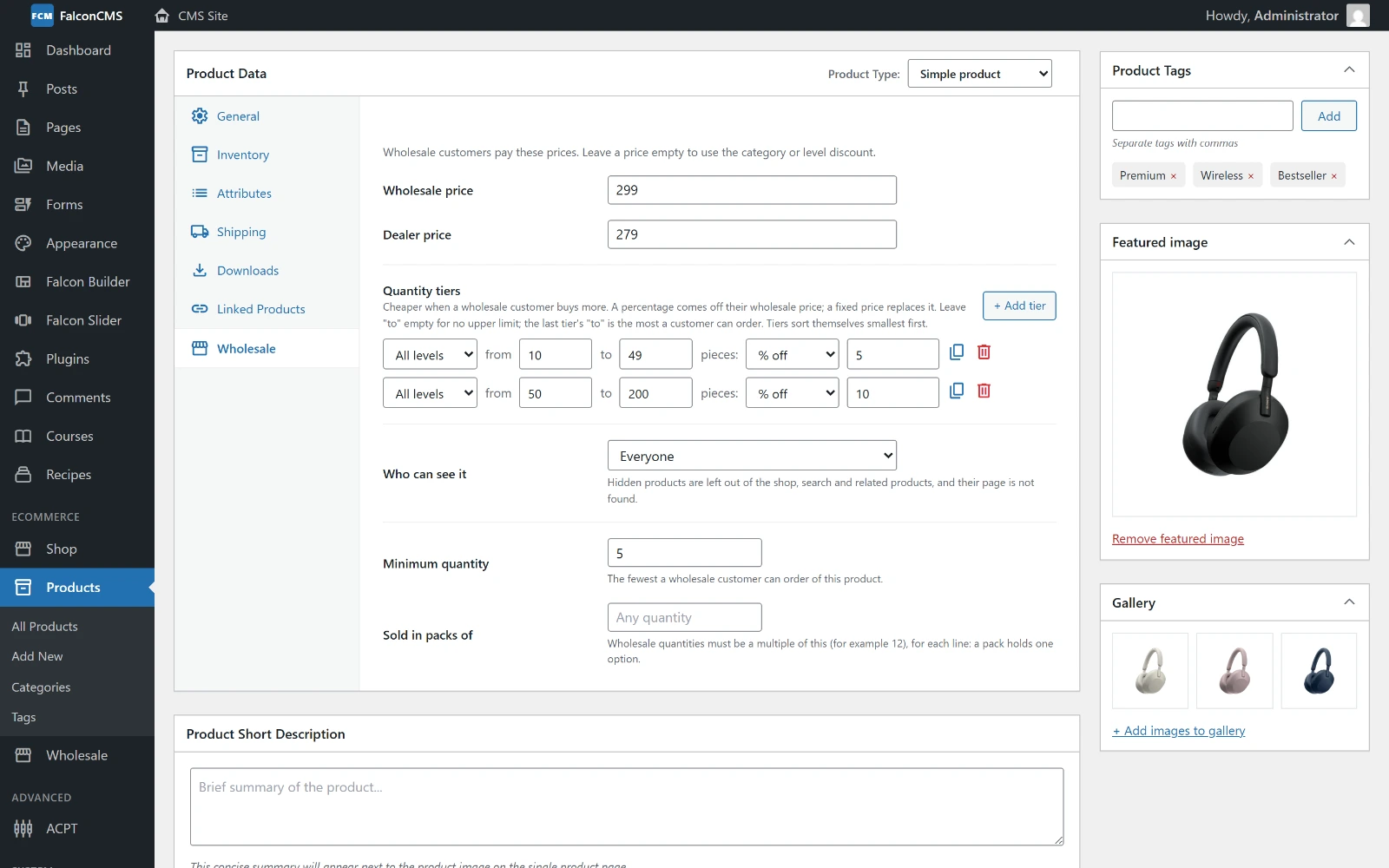
A price for each level, two quantity tiers, who can see the product, a minimum quantity and a pack size.
| Field | What it does |
|---|---|
| {Level} price | One box per level. Leave it empty to use the category or level discount (the box shows which, as a placeholder). |
| Quantity tiers | Cheaper prices for bigger quantities; see Quantity tiers |
| Who can see it | Everyone, wholesale customers only, or retail customers only; see Who sees which products |
| Minimum quantity | The fewest a wholesale customer can order of this product |
| Sold in packs of | Wholesale quantities must be a multiple of this (12, say), per cart line |
For a variable product the prices per level are set on each variation instead: open Variations, and each variation has a Wholesale price box per level. A variation without one gets the category or level discount.
The ordering rules (minimum, packs, maximum) are explained on Ordering & Checkout.
Quantity tiers
Tiers make a product cheaper when a wholesale customer buys more. Each tier is a range and a price:
- Levels — all levels, or one level only. When tiers overlap, one made for the customer's level wins over an "all levels" one.
- From … to … pieces — leave to empty for no upper limit.
- % off the customer's wholesale price (or the retail price, when there is none), or price each, a fixed price that replaces it.
Tiers sort themselves, smallest first. The duplicate button copies a tier and starts the copy where the original ends, so building a ladder is quick: 10–49 at 5% off, duplicate, 50–200 at 10%.
The last tier's "to" is the most a wholesale customer can order of the product. The quantity box stops there and the cart refuses more. Leave it empty for no maximum.
On the product page the tiers are a picker tied to the quantity box: choosing a tier puts its quantity in the box, and typing a quantity (or using + and −) selects the tier it falls in. The tier a line is priced at is shown with it in the cart, mini-cart, checkout, order confirmation, the admin order, invoices and the order email.
Variable products: percentages only
On a variable product, tiers can only be percentages. One fixed price would be wrong for options priced differently; set each option's own wholesale price in Variations.
Mix & match
The variations of one product always count together for its tiers: 10 red and 10 blue reach a 20+ tier.
To let different products count together, tick Mix & match on a product category. In the cart, any 50 products of that category reach a 50+ tier (each product still uses its own tiers). The cart line says how many were counted together, and the product page says which categories mix.
Category discounts
Edit a product category and you'll find Wholesale discount: a percentage off for each level. It applies to every product in the category that has no wholesale price of its own. A product in several categories gets the biggest discount.
Contract prices
A contract price is a price for one company, agreed with them, whatever its level. Add it on the customer's screen under Contract prices: a SKU or product ID and a price each. A variation's SKU prices just that option; the product's SKU or ID prices every option. Saving the same product again changes its price.
A contract price wins over level, category and tier prices, and everyone in the company gets it.
Who sees which products
Each product's Who can see it setting:
| Option | Effect |
|---|---|
| Everyone | The default |
| Wholesale customers only | Hidden from everyone else |
| Retail customers only | Hidden from wholesale customers |
A hidden product is left out of the shop, search, related products and upsells. Its page answers "not found" and it cannot be bought.
For page content, wrap anything in a shortcode:
[falcon_wholesale_only]Trade terms: 30 days net.[/falcon_wholesale_only]
[falcon_retail_only]Free returns within 14 days.[/falcon_retail_only]
[falcon_wholesale_only] shows nothing to others, or a message with message="…", with a sign-in link when you add login="yes".
Who sees prices
Settings → Who sees prices decides whether prices are public:
| Option | Effect |
|---|---|
| Everyone | A normal shop |
| Signed-in customers only | Guests see "Log in to see prices" instead of the price and cannot add to the cart |
| Wholesale customers only (B2B shop) | Only approved trade customers see prices and can buy; others see "Log in to buy" or "Apply for wholesale" |
Hidden prices are also left out of what search engines read.
To close the whole storefront, use Private store instead (see Settings).
Price filter and sort
The shop's price filter, price sort and price band show what the customer's level pays, not retail. They read a price index, which is updated when a product, category or level is saved, every night, and from Settings → Price index → Rebuild the price index.
Prices in a spreadsheet
Wholesale → Import / export handles every wholesale price at once.
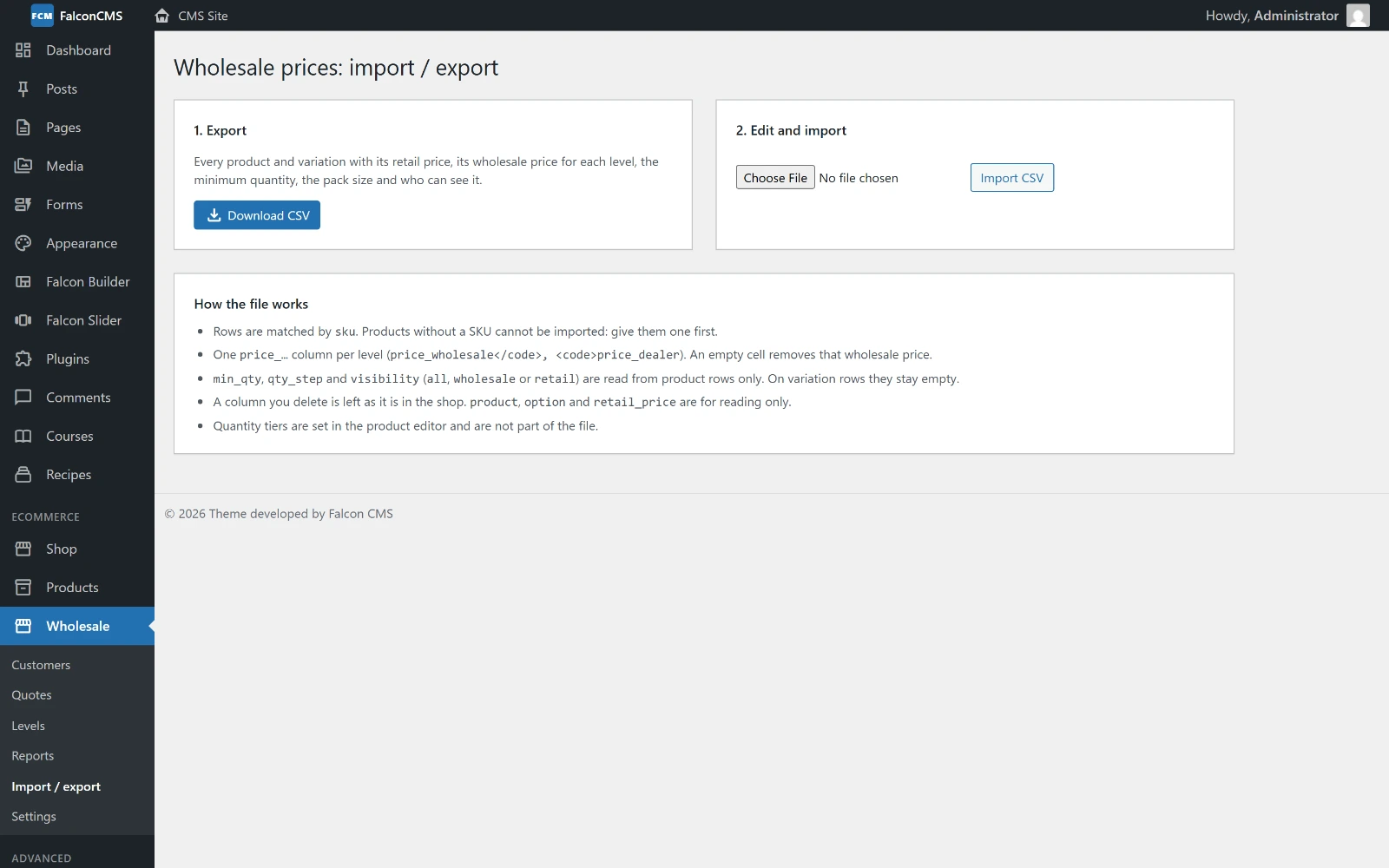
Download every product and variation as CSV, edit it in Excel, and import it back.
- Download CSV. Every product and variation, with its retail price, its wholesale price for each level (
price_wholesale,price_dealer…), the minimum quantity, the pack size and who can see it. - Edit it in a spreadsheet.
- Import CSV.
How the file is read:
- Rows are matched by SKU. Products without a SKU cannot be imported; give them one first.
- An empty cell removes that wholesale price. A column you delete is left as it is in the shop.
min_qty,qty_stepandvisibility(all,wholesaleorretail) are read from product rows only; on variation rows they stay empty.product,optionandretail_priceare for reading only.- Quantity tiers are set in the product editor and are not part of the file.