
Settings & Tools
Everything in Wholesale → Settings, then the reports, emails, text messages and scheduled tasks.
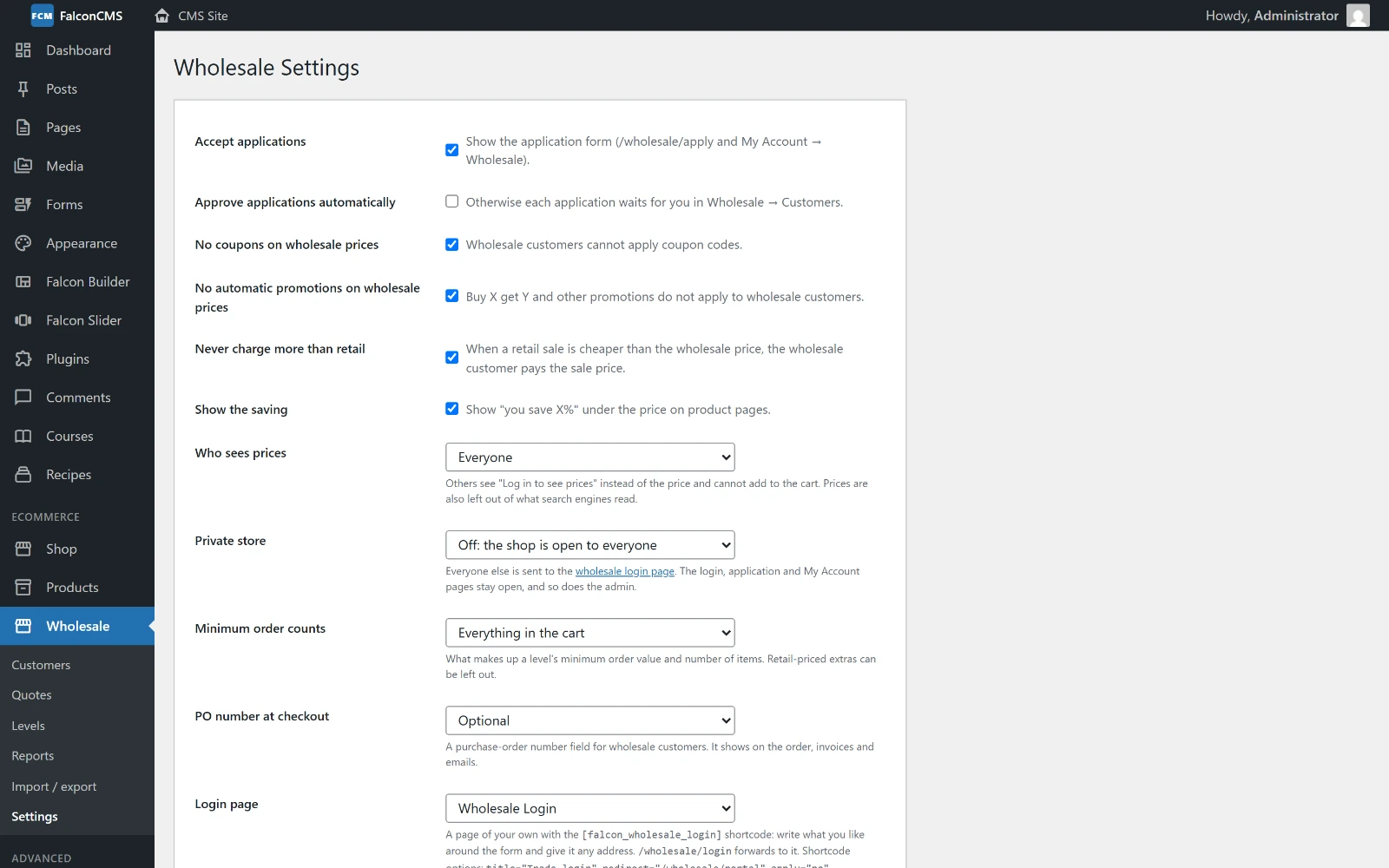
The top of the settings page: applications, coupons and promotions, never more than retail, who sees prices and the private store.
General
| Setting | Default | What it does |
|---|---|---|
| Accept applications | On | Shows the application form at /wholesale/apply and in My Account → Wholesale |
| Approve applications automatically | Off | Otherwise each application waits for you in Wholesale → Customers |
| No coupons on wholesale prices | On | Wholesale customers cannot apply coupon codes |
| No automatic promotions on wholesale prices | On | Buy X get Y and other promotions do not apply to wholesale customers |
| Never charge more than retail | On | When a retail sale is cheaper than the wholesale price, the wholesale customer pays the sale price |
| Show the saving | On | "You save X%" under the price on product pages |
| Who sees prices | Everyone | Everyone, signed-in customers only, or wholesale customers only; see Prices |
| Private store | Off | Close the storefront to everyone but signed-in or wholesale customers; see below |
| Minimum order counts | Everything in the cart | Or only items at a wholesale price, for a level's minimum order |
| PO number at checkout | Optional | Off, optional or required |
| Login page | Wholesale Login | The page holding the [falcon_wholesale_login] form; see Login & Portal |
| Price label | Wholesale price | The words next to a wholesale price ("Wholesale price · Dealer") |
| Email new applications to | The shop's new-order address | Who hears about a new application |
| Terms to accept | Empty | When filled, applicants must tick a box with this text |
| Quote requests | Wholesale customers | Who sees "Request a quote" in the cart: wholesale customers, any signed-in customer, or off |
Private store
| Option | Effect |
|---|---|
| Off: the shop is open to everyone | A normal shop |
| Signed-in customers only | Guests are sent to the wholesale login page |
| Approved wholesale customers only | Anyone who is not an approved trade buyer is sent there |
The login, application and My Account pages stay open, and so does the admin.
Credit accounts and invoices
| Setting | Default | What it does |
|---|---|---|
| Default days to pay | 30 | For customers buying on account without their own terms |
| Overdue accounts | On | No new orders on account while anything is overdue |
| Remind before due | 3 days | How many days before a payment is due the customer is reminded. They are reminded again once it is overdue. |
| Your BIN / VAT number | Empty | Printed on invoices and challans |
| Invoice footer | Empty | Printed at the bottom: bank details, terms, a thank-you |
See Buying on account and Invoices.
Text messages (SMS)
The plugin texts customers through any SMS provider that has an HTTP API, which covers almost all of them, including the Bangladeshi gateways.
| Setting | What it does |
|---|---|
| Send SMS | Off, or Through my SMS provider (HTTP) |
| Provider URL | From your provider's API page. Put {to} where the number goes and {message} where the text goes. |
| Method | GET (everything in the URL) or POST (form fields you list) |
| Country code | Picked from a searchable list of every country. It is added to local numbers that start with 0: with Bangladesh (+880), 01711223344 becomes +8801711223344. Numbers written with + or 00 are sent as they are. |
| Send when | Tick the events: account approved, order placed, payment received, payment due or overdue, quote ready |
| Messages | What each text says (below) |
Messages. Each event has its own text. Start from a ready-made one, in English or Bangla (one click puts it in the box), and change it as you like. Placeholders such as {name}, {amount} and {balance} are filled in when it is sent, and a live count shows the characters and SMS parts. An empty box sends the built-in English text. Bangla texts fit 70 characters per SMS instead of 160, so they cost more.
Save the settings, then use Send a test SMS to check them. Staff can also text a customer by hand from the customer's screen (Send an SMS), with ready-made messages to pick from.
Sales reps
Add a rep with a user's email and a commission percentage; see Sales reps.
Tools
- Create the login page — makes the Wholesale Login page if it is missing, brings it back from the trash, or publishes it, and sets it as the login page. Its content is never changed.
- Rebuild the price index — the price filter and sort use what each level pays. The index updates by itself when you save a product, a category or a level, and every night. Rebuild it now if you changed retail prices in bulk (for example by import).
Reports
Wholesale → Reports covers a period: the last 30 or 90 days, this month, this year, or dates you choose.
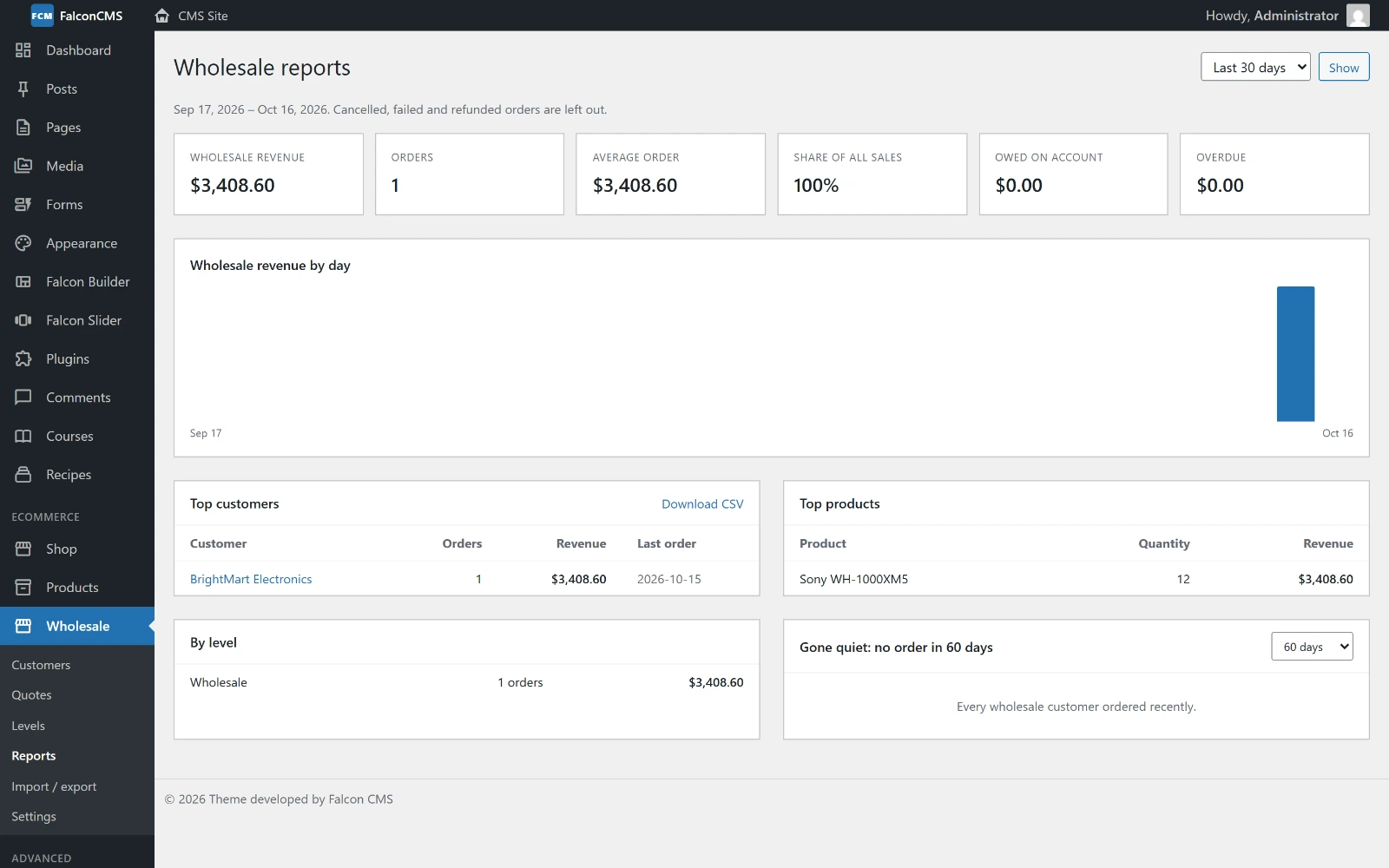
Revenue, orders, average order, share of all sales, what is owed and overdue, revenue by day, top customers and products, revenue by level, and customers who have gone quiet.
- Wholesale revenue, orders, average order and share of all sales
- Owed on account and overdue
- Revenue by day and by level
- Top customers (company members counted with their company), with a CSV download
- Top products
- Gone quiet — customers with no order in 30, 60, 90 or 180 days
- Sales reps — orders, revenue and commission per rep
Cancelled, failed and refunded orders are left out.
Emails
The plugin emails customers and staff when:
| To | |
|---|---|
| Application received | You (the address in Settings) |
| Application approved or rejected (with your reason) | The applicant |
| Team invitation | The person invited to a company |
| Order needs approval / approved / declined | Owners and managers / the buyer |
| Quote ready | The customer |
| Payment due soon / overdue | Credit customers |
| Reorder reminder | Whoever set a reminder on a saved list |
| New order of a customer | Their sales rep |
Every wholesale email uses one responsive layout with your shop email header image (or your logo, or your shop name), your theme's primary colour and the shop email footer text. A theme can override any of them under falcon-wholesale::emails.*.
Scheduled tasks
These run through the Laravel scheduler, so the site's cron must call php artisan schedule:run every minute (see Scheduled Tasks).
| Command | When | What it does |
|---|---|---|
falcon:wholesale-reindex | Daily, 03:30 | Rebuilds the price index |
falcon:wholesale-credit-reminders | Daily, 09:00 | Emails (and texts) payments due soon and overdue |
falcon:wholesale-list-reminders | Daily, 09:15 | Sends saved-list reorder reminders that are due |
Shortcodes
| Shortcode | What it shows |
|---|---|
[falcon_wholesale_login] | The wholesale login form; options title, redirect, apply="no" |
[falcon_wholesale_apply] | A link to the application form |
[falcon_wholesale_only]…[/falcon_wholesale_only] | Content for wholesale customers only; options message, login="yes" |
[falcon_retail_only]…[/falcon_retail_only] | Content hidden from wholesale customers |