
Builder Elements
Elements marked Pro need a Pro licence. The builder shows them in the palette with a lock badge and prompts to upgrade when you add one. Every other element is part of the free core.
Elements are the content blocks inside columns.
The complete, current list — with what each one does and which need Pro — is in Builder Overview → All Built-in Elements. This page covers the settings behind them.
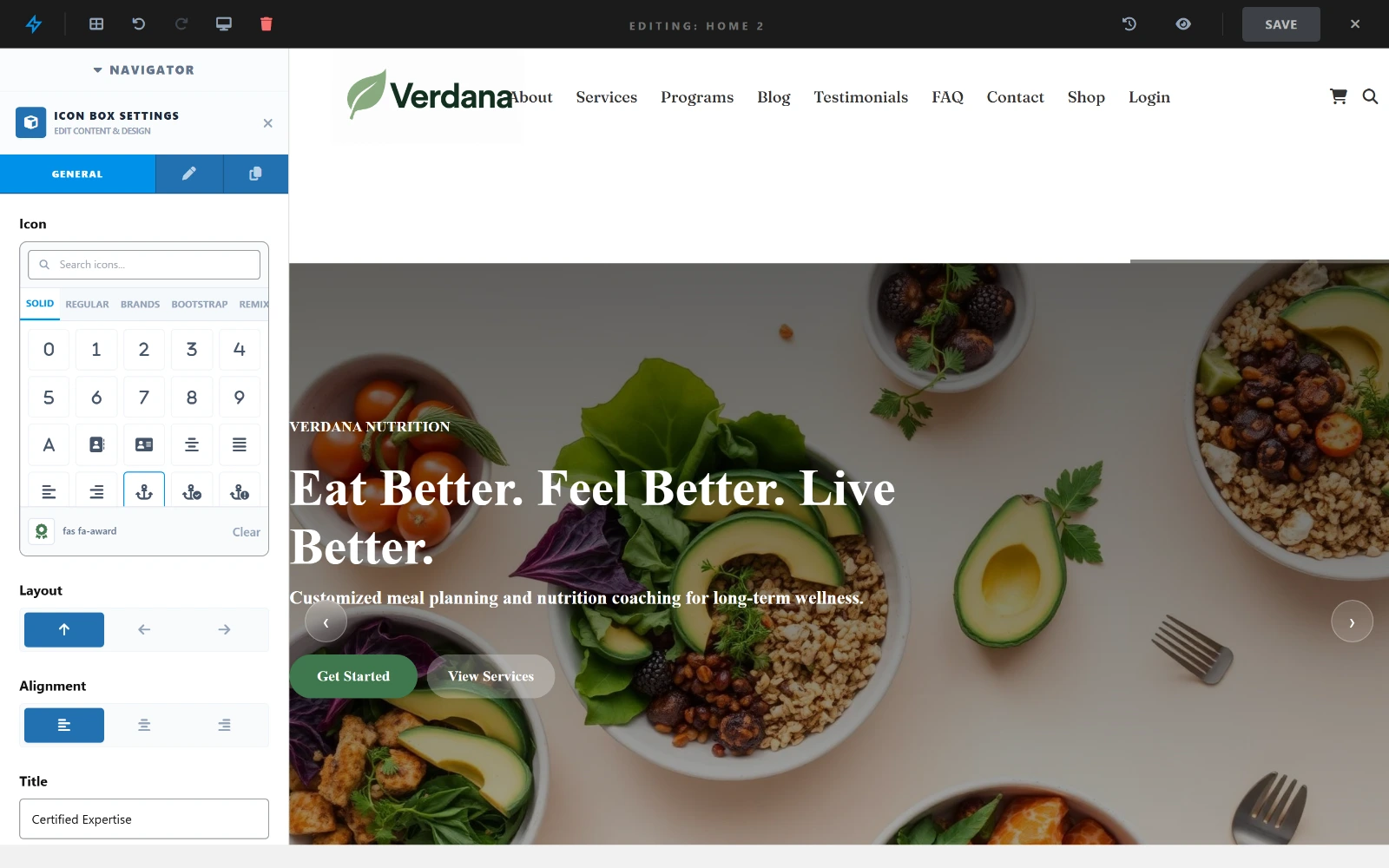
Selecting an element opens its settings in the sidebar — here an Icon Box, with the icon picker, layout and alignment.
Text Elements
Title
A dynamic post/page title element — automatically pulls the current content's title. Useful in templates, header builder, and single post layouts.
Settings:
- Tag (H1–H6)
- Font size, weight, color
- Text alignment
Text Block
A rich-text paragraph block with a WYSIWYG editor.
Settings:
- Content (WYSIWYG)
- Font size, line height
- Text alignment
- Color
Ticker Pro
A horizontally scrolling text marquee — great for announcements or news tickers.
Settings:
- Items (list of text lines)
- Speed
- Direction (left / right)
- Separator style
- Font size, color, background
Media Elements
Image
A single image with optional link.
Settings:
- Dynamic Source — pull the image automatically from context:
Feature Image— the current post's featured imageAuthor Avatar— the post author's avatarSite Logo— the logo set in Customizer → General → Logo
- Image URL (media library picker, used when no dynamic source is selected)
- Alt text
- Width / Max Width
- Link URL — static URL or dynamic source:
Site URL— links to the site homepagePost URL— links to the current post's permalink
- Link target (
_blank,_self) - Aspect ratio + focus point (X/Y) for cropped images
- Border radius, border (per-side), box shadow
- Hover effect
- Sticky width (shrinks when header is sticky)
Gallery Pro
A responsive image grid or slider.
Settings:
- Images (multi-select from media library)
- Layout: grid / masonry / slider
- Columns (2, 3, 4)
- Gap between images
- Lightbox on click
Video
Embed YouTube, Vimeo, or self-hosted video.
Settings:
- Video URL
- Autoplay, Loop, Mute
- Show/hide controls
- Aspect ratio
Interactive Elements
Counter Pro
An animated number that counts up on scroll.
Settings:
- Starting number
- Final number
- Duration (ms)
- Prefix (e.g.,
$) - Suffix (e.g.,
+,k) - Label (caption below number)
- Font size, color
Example: $ → 10,000 → + counted from 0 in 2000ms.
Accordion Pro
Collapsible FAQ / content sections.
Settings:
- Items (title + content pairs)
- Single open mode (collapse others on open)
- Icon (arrow / plus)
- Icon position (left / right)
- Colors, border, padding
Tabs Pro
Tabbed content panels.
Settings:
- Tabs (label + content pairs)
- Default active tab
- Tab alignment (left, center, right)
- Style (underline / pill / border)
Layout Elements
Button
A call-to-action button.
Settings:
- Text
- Link URL + target
- Style: solid / outline / ghost
- Colors: background, text, border
- Hover: background, text, border
- Hover Border 2.7.0 — width per edge and colour, sitting directly under the border they change. Leave a field empty to keep the border's own value on hover;
0is a real answer and means "no border on that edge while hovered". - Hover Animation 2.7.0 — Lift Up, Sink Down, Grow, Shrink, Glow or Pulse. Readers whose system asks for reduced motion get none of them.
- Border radius
- Padding
- Icon (FontAwesome class + position)
- Full width toggle
Alignment and Full Width
With Full Width (Span) off, Alignment places the button within its row. With it on the button already fills the row, so Alignment moves the label inside the button instead. Set per device, like the other responsive controls.
Card Pro
A content card with image, title, description, and optional button.
Settings:
- Image (media library)
- Title, description
- Button text + link
- Border radius, shadow
- Hover effect
Spacer
Empty vertical space for layout control.
Settings:
- Height (px)
- Desktop / Tablet / Mobile heights (responsive)
Icon Box Pro
An icon paired with a title and description.
Settings:
- Icon (FontAwesome class)
- Icon size, color, background
- Title
- Description
- Link
- Layout: icon above / icon left
Item List Pro
A styled list with icons.
Settings:
- Items (icon + text pairs)
- Icon color
- Text size, color
- Gap between items
Post & Dynamic Elements
Post Content
Renders the full content of the current post — used in single post/page templates.
Post Meta
Displays post metadata — author, date, category, tags, etc.
Settings:
- Select which meta fields to show
- Date format
- Separator style
Star Rating Pro
Display a static star rating.
Settings:
- Rating value (0–5)
- Icon color
- Size
Advanced Elements
HTML Block Pro
A raw HTML block — paste any embed code or custom markup.
Settings:
- Raw HTML / embed code
Menu Pro
Render a navigation menu inline inside the builder canvas — primarily used in the header builder.
Settings:
- Select menu (by location or slug)
- Layout: horizontal / vertical
- Item padding, spacing, border radius
- Colours and hover colours for text, background and border
- Mega menu support
The hover colours and border also describe the current item — the page being viewed, or on a landing page the section being read. See One-page menus.
Element Settings (All Elements)
Every element has these shared settings in the General tab:
Element Visibility
Control which devices see this element:
[ Desktop ] [ Tablet ] [ Mobile ]Click a device to toggle visibility. Useful for showing different content per breakpoint.
CSS Class
Add one or more custom CSS classes to the element wrapper.
CSS ID
Add a unique ID for anchor links or JavaScript targeting.
Extra Options Tab
- Custom CSS (applied to this element only)
- Hover effects
- Animation on scroll (fade, slide, zoom)
- Z-index
- Position (static, relative, absolute)
Dynamic Values
Many text fields support dynamic tokens — they're replaced at render time:
| Token | Replaced with |
|---|---|
{post_title} | Current post's title |
{post_excerpt} | Post excerpt |
{post_date} | Published date |
{site_name} | Site name from settings |
{current_date} | Today's date |
{author_name} | Post author's name |
Example: Set a Heading text to Welcome back, {author_name}! for a personalized greeting.
Older layouts
A page saved by an earlier version may still contain one of these. They keep rendering exactly as they did, but they are no longer offered in the element picker — Title, Text Block and Card cover what they did.
Heading (legacy)
A title or subtitle block (H1–H6). Settings: text, tag, font size / weight / line height, letter spacing, alignment, colour, CSS class and ID.
Text (legacy)
A single-line text element with dynamic source support. Settings: text or dynamic source (post title, site name, …), font size / weight / colour, alignment.
Post Grid (legacy)
Posts in a grid. Settings: post type, limit, category and tag filters, order by and direction, columns, which parts to show (thumbnail, title, excerpt, date, author, read-more) and pagination.