
Coupons
Coupons let customers apply discount codes at checkout.
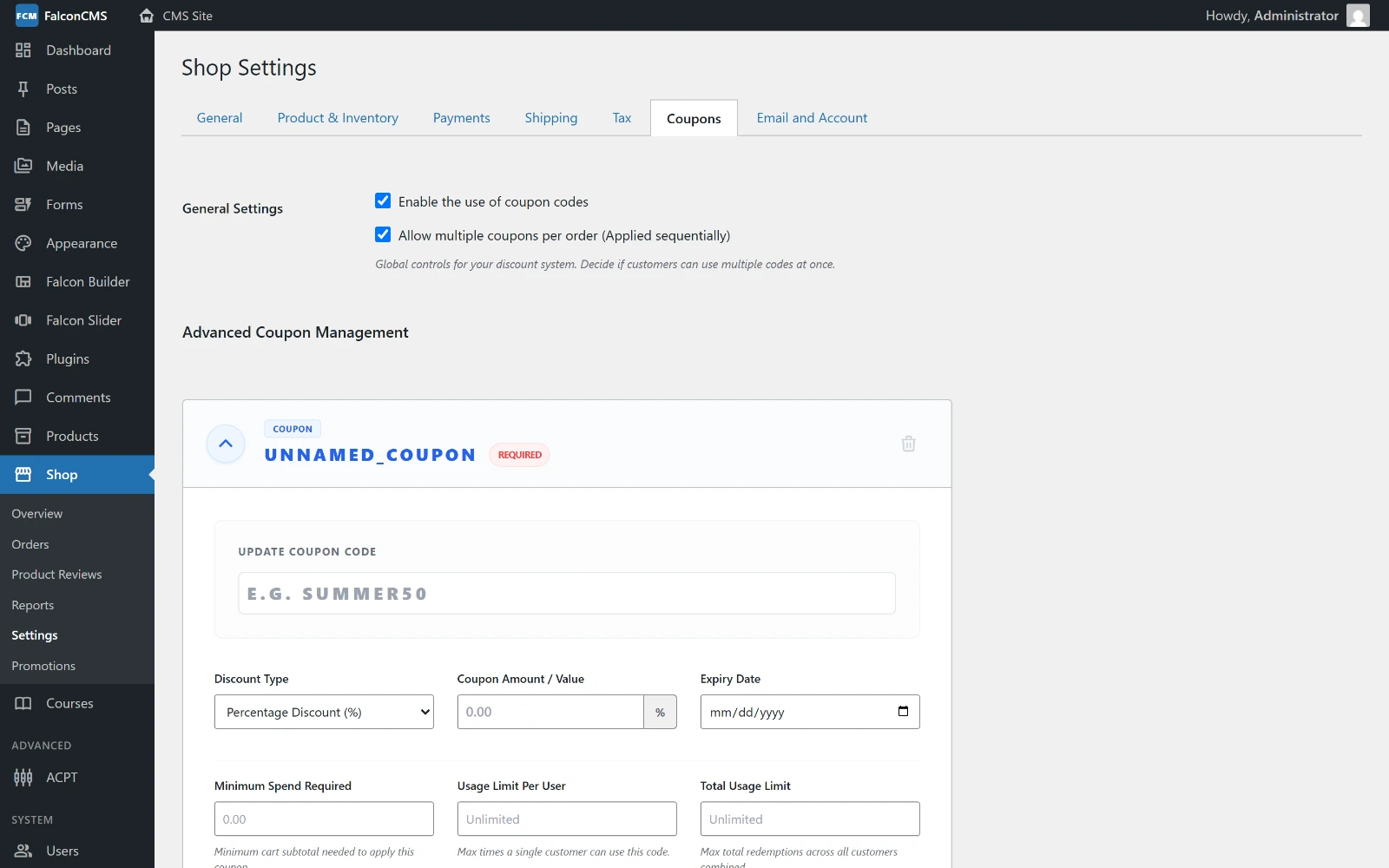
Each coupon is a card on the Coupons tab. Adding one opens the code, discount type and value, expiry, minimum spend, and the two usage limits.
Creating a Coupon
Go to Admin → Shop → Settings → Coupons (or wherever your CMS routes it):
| Field | Description |
|---|---|
| Coupon Code | The code customers enter (e.g., SUMMER20) |
| Discount Type | percent, fixed_cart, fixed_product or free_shipping |
| Coupon Amount / Value | Amount (e.g., 20 for 20% or $20 off) |
| Expiry Date | Optional expiration |
| Minimum Spend Required | Cart subtotal the coupon needs before it applies |
| Usage Limit Per User | Times one customer may use the code — blank for unlimited |
| Total Usage Limit | Redemptions across all customers — blank for unlimited |
Two global switches sit above the coupon cards: whether coupon codes are accepted at all, and whether more than one may be stacked on an order.
How Coupons Work
- Customer adds items to cart
- On the cart page, enters the coupon code
- If valid: discount is applied to the cart total
- At checkout: discounted total is charged
Coupon Types
Percentage Discount
Order total: $100
Coupon: SAVE10 (10% off)
Discount: -$10
Final total: $90
Fixed Amount Discount
Taken off the cart total once.
Order total: $100
Coupon: FLAT15 ($15 off)
Discount: -$15
Final total: $85
Fixed Product Discount
Taken off each unit the coupon applies to. Restrict it to particular products or categories, or leave it unrestricted and it applies to every unit in the cart.
Cart: 3 × T-shirt ($20 each) = $60
Coupon: TEE5 ($5 off each product)
Discount: -$15   (3 units × $5)
Final total: $45
Free Shipping
Zeroes every shipping method rather than discounting the goods, so the saving appears on the shipping line where the customer expects it.
Order total: $100
Shipping:    $12
Coupon: SHIPFREE
Shipping:    $0
Final total: $100
Stacking
Shop → Settings → Coupons decides whether more than one coupon may be applied to the same order. When stacking is off, applying a second coupon replaces the first.
Coupon Model
use Acme\CmsDashboard\Models\Coupon;

// Create a coupon
Coupon::create([
    'code'           => 'WELCOME50',
    'discount_type'  => 'percentage',
    'discount_value' => 50,
    'usage_limit'    => 100,
    'is_active'      => true,
    'expires_at'     => now()->addMonths(3),
]);

// Check if coupon is valid
$coupon = Coupon::where('code', 'WELCOME50')
    ->where('is_active', true)
    ->first();

if ($coupon && $coupon->usage_count < $coupon->usage_limit) {
    // Apply discount
}