
Products
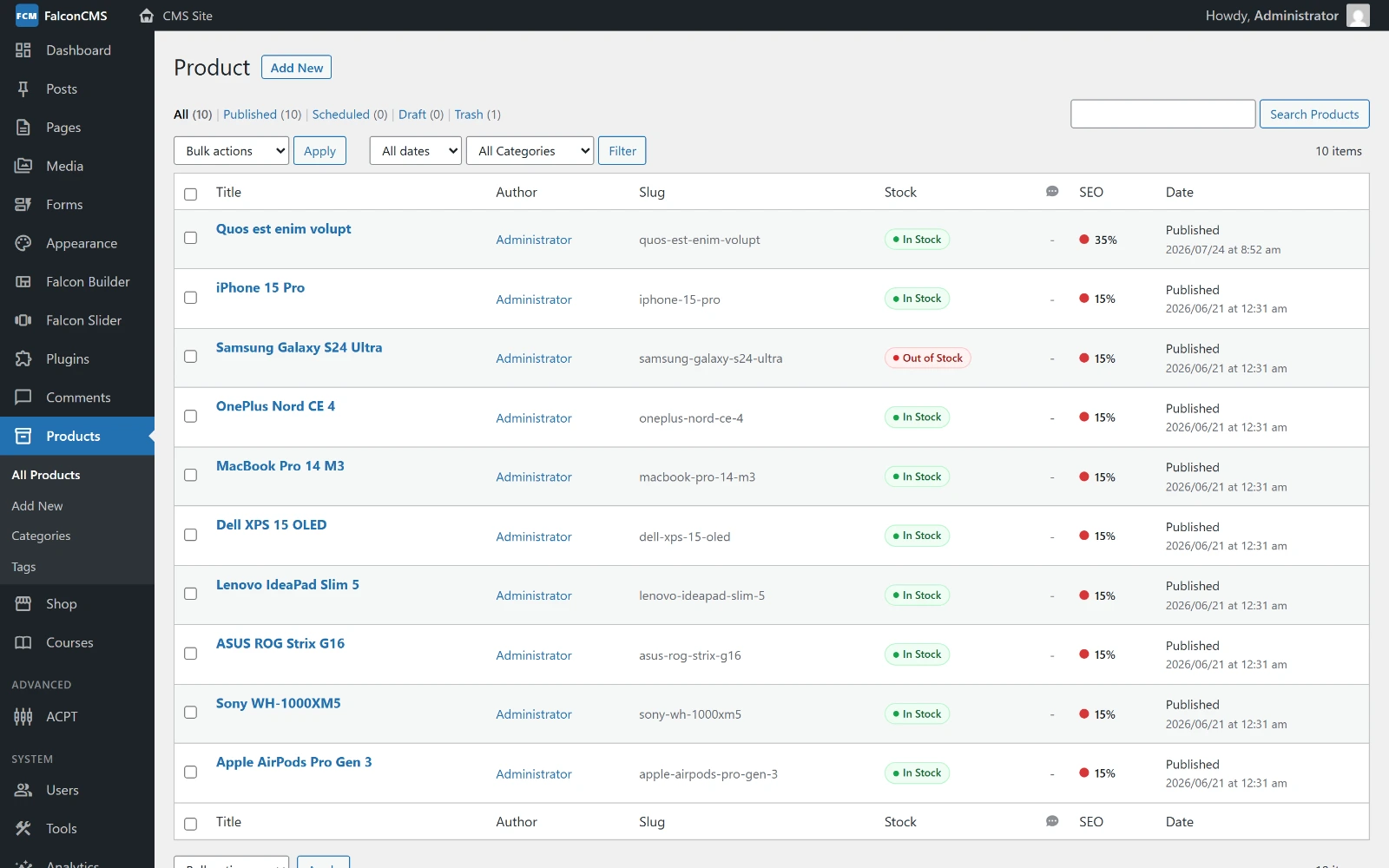
The catalogue — Admin → Products — with price, stock and category per row.
Creating a Product
- Go to Admin → Products → Add New
- Fill in the product details:
- Title — Product name
- Description — Full description (Classic editor or Falcon Builder)
- Short Description — Shown in product card
- Featured Image — Main product photo
- Gallery — Additional photos
- Price — Regular price
- Sale Price — Discounted price (optional)
- SKU — Stock keeping unit
- Stock Status — In stock / Out of stock / Backorder
- Stock Quantity — Number in stock (requires Manage Stock enabled)
- Select Product Category and Product Tags
- Set SEO meta fields (optional)
- Click Publish
Product Categories
Product Categories are a dedicated, first-class taxonomy — separate from Post categories.
Admin → Products → Categories:
- Hierarchical (parent → child)
- Each category has: name, slug, description
- Supports multi-language
- AJAX inline creation from the product editor
Frontend URL: /product-category/{slug}
Product Tags
Flat taxonomy for product tagging.
Admin → Products → Tags
Frontend URL: /product-tag/{slug}
Variable Products
Variable products have options like size or color, each with their own price and stock.
Creating a Variable Product
- Create a product as normal
- Scroll to the Variations section
- Add variation attributes (e.g., Size: S, M, L)
- For each variation, set: price, sale price, SKU, stock status
Frontend: the shop grid and the product page show a price range built from the variations (৳1,500 – ৳2,500, or a single figure when every variation costs the same). Once a customer picks a variation, the exact price replaces the range.
A variable product is only as available as its variations: sell the last of every size and the product reads as out of stock, on the badge and in the In stock only filter alike.
Attributes
Product Data → Attributes. Each attribute has a name, a |-separated list of values, and three switches:
| Switch | Effect |
|---|---|
| Visible on the product page | Lists the attribute in the Additional information table |
| Used for variations | Makes the values selectable, for variable products |
| Show in filters | Offers the attribute in the shop's filter sidebar |
The three are independent — an attribute can filter the shop without appearing on the product page, or the reverse. Show in filters defaults to on, so a new attribute is filterable without extra work.
TIP
For a variable product, the filter offers the values its variations actually provide, not everything the parent declares — so a colour nobody built a variation for is not offered to shoppers who cannot buy it.
Shipping Details
Product Data → Shipping holds weight and dimensions. Weight is used by weight-based shipping rates; a variation may carry its own weight and otherwise inherits the product's.
Linked Products
Product Data → Linked Products picks what to suggest alongside this one:
| Link | Where it shows |
|---|---|
| Upsells | On this product's page, as You may also like — the better or larger version |
| Cross-sells | In the cart, once this product is in it — the case, the cable, the spare |
Related products need no setup: they are drawn from the product's own category, topped up with recent products when the category is thin.
Inventory Management
| Stock Status | Description |
|---|---|
instock | Product available for purchase |
outofstock | Cannot be added to cart |
backorder | Can be ordered but will ship when available |
Enable Manage Stock to track exact quantities. Stock is claimed when the order is placed, in a single conditional update — two shoppers racing for the last item cannot both win it.
Backorders (Product Data → Inventory) decide what happens at zero:
| Setting | Behaviour |
|---|---|
no | Cannot be bought once the shelf is empty |
notify | Can be bought, and the cart says Available on backorder |
yes | Can be bought silently; stock is allowed to go negative |
Shop → Settings → Products → Out of stock threshold sets the floor. At or below it a product reads as sold out — useful for holding back a safety margin.
Product Custom Fields
Add custom fields to products using the ACPT system:
- Go to Admin → ACPT
- Find or create the
productpost type - Add a Field Group with your fields
- Fields appear in the product editor
Read in templates:
$material = get_custom_field($post, 'material');
$warranty  = get_custom_field($post, 'warranty_years');
Product Reviews
Customers can leave star ratings and text reviews on product pages.
Moderate reviews: Admin → Shop → Reviews
- Approve or reject reviews before they show publicly
- Bulk approve/reject
Querying Products in Code
// Get all published products
$products = get_falcon_posts([
    'type'  => 'product',
    'limit' => 12,
]);

// Filter by product category
$phones = get_falcon_posts([
    'type'       => 'product',
    'product_category' => 'phones', // category slug
    'limit'      => 6,
    'orderby'    => 'date',
    'order'      => 'DESC',
]);

foreach ($products as $product) {
    echo $product->title;
    echo $product->shopData->price;
    echo $product->shopData->stock_status;
    echo get_falcon_permalink($product);
}